LINQ-To-SQL: Updating Disconnected Entity Objects

| 1 Comment | No TrackBacks

Here’s the skinny:  Don’t get into a situation where you have to update an object from a disconnected DataContext.  You will fail, and miserably.

Sure, you can do some Googling and find some resources on the subject, and even find some slightly tolerable solutions.. but even those require some nasty stuff, some hard coding of methods in the DataContext class itself, and/or adding versioning field to your database table.

Google:  “linq disconnected updates” and “LINQ Update Disconnected Entity Objects”

The best solution that I found, that worked for me – was a bit more of tightly coupling what was happening, and passing around an open DataContext from start-to-finish through the various methods.

It seems to me that the best way would be something hypothetical like this:

[your]DataContext.Update<[YourTable]>([YourEntityObject]);
[your]DataContext.SubmitChanges();

Of course, that “Update” method doesn’t exist, only the “Attach” method that seems like it should do what we want, but doesn’t really.  The “Update” method of course, would update using only the primary key of the entity to perform the update.  I suppose I see why this might not exist due to complications with child entity objects.

The other alternative AFAIK is to create a CopyFromEntityToEntity extension method or class method to copy from the object you wish to update, to an object acquired from the database during the update method.  Something like the following:

//Warning, this is pseduo-code and will not work for various reasons and should be a generic method.  This also assumes the PK is a GUID[uniqueidentifier] field.  There is no error checking, etc.
void Update(orders_mainTable updateEntity, Guid identifier) {
  myDataContext dc = new myDataContext();
  
  var original = dc.Table.Where(o => o.Guid == identifier).SingleOrDefault();
  if (original == null)
    throw new Exception(“Original Entry in Database Not Found.”);

  // Some Extension Method?
  original.CopyFrom(updateEntity);

  // Update the database
  dc.SubmitChanges();
}

The CopyFrom method would iterate over the reflected values of the objects and copy the data from the “updateEntity” object to the original object.  This way, you’re not going to run into any issues issuing an update to a 'disconnected’ object.

Good luck!  This one sure makes me mad though.. LINQ-to-SQL should be smart enough to take care of this for [us] automatically in my opinion.  This is going to be a huge issue for n-tier disconnected architectures.  Instead of being able to fully take advantage of X,Y,Z those portions that do the updating will have to go through hoops like the example above to be able to update something.

Note:  My example above does not address child objects that may be stored along with the entity.

P.S.  I absolutely love LINQ [with the exception of this!].  I had to re-write a substantial part of the application I am working on after some major database changes for features requested by the client.. well, I made a decision to replace portions of code that were already written that needed to be update with LINQ-To-SQL stuff.. and wow!  I was able to write the new LINQ-based code with more features than the original code had.. and implement it faster than I would have been able to modify the existing code to update it to the new requirements. 

Wow.

Further Reading: 

Rick Strahl has some interesting information on this topic as well but offers some more detail in the suggestions such as adding a timestamp field, etc.
Link:  LINQ to SQL and Disconnected Entities Follow-up

Omar Al Zabir has some ideas as well.
LINK:  Linq to SQL: How to Attach object to a different data context

Here are some other generic Google results that I found during research:
http://msdn.microsoft.com/en-us/bb546187.aspx

http://geekswithblogs.net/michelotti/archive/2007/12/30/118076.aspx

http://social.msdn.microsoft.com/forums/en-US/linqprojectgeneral/thread/6f42d725-4540-4044-be86-afc7bc2d2b46/

http://stackoverflow.com/questions/273578/linq-to-sql-disconnected-updating-object-from-different-data-context

Thanks!

Matthew MacSuga

LINQ-to-SQL – Love it, or Hate It

| 1 Comment | No TrackBacks

I choose to love it.

Here is a post that I posted on Stack Over Flow, asking for some assistance in generating the following query seen below: 

Complicated query with aggregate data for a report from multiple tables for an ordering system

from pmt in products_mainTable
join opt in orders_productsTable on pmt.guid equals opt.products_mainTableGUID into tempProducts
from orderedProducts in tempProducts.DefaultIfEmpty()
join omt in orders_mainTable on orderedProducts.orders_mainTableGUID equals omt.guid into tempOrders
from ordersMain in tempOrders.DefaultIfEmpty()
group pmt by new { pmt.sku, orderedProducts.color, orderedProducts.size } into g
orderby g.FirstOrDefault().sku
select new {
    g.FirstOrDefault().guid,
    g.Key.sku,
    g.Key.size,
    QTY = g.FirstOrDefault().orders_productsTable.Sum(c => c.qty),
    SUM = g.FirstOrDefault().orders_productsTable.Sum(c => c.itemprice * c.qty),
    AVG = g.FirstOrDefault().orders_productsTable.Average(c => c.itemprice * c.qty),
    Some = g.FirstOrDefault().orders_productsTable.Average(p => p.qty).GetValueOrDefault(0),
};

I’ve got to say that working with LINQ-TO-SQL has been an absolute pleasure.  I even fired up LINQPad and have really been enjoying the use of that program.  The $19 for the IntelliSense was definitely worth it.  What a great tool.

I can now take the query above into my code, and render it into reports, grids, etc. and whatever else I need it for using my DevExpress framework.  Exciting stuff, to be sure.

I’ll write some more on this topic when I have some additional time, but since I had a difficult time Googling for the answer on my Stackoverflow question, I thought I’d write about it here.

The above represents how to do a full LEFT OUTER JOIN in LINQ and C# while performing GROUPING and AGGREGATE functions.  Hopefully this will be a good starting place for someone else looking to do the same thing.

The important bits here are DefaultIfEmpty() which helps to perform the LEFT OUTER JOIN and FirstOrDetaulf() which allows you access to the underlying type.  While I knew about DefaultIfEmpty() I did not know about FirstOrDefault().. using FoD was the real key to making this query work the way that I wanted it to.

Now I am able to quickly and easily query my sales data.  This query for instance queries the products table, finds products that have sold and generates a quick report that I can use as a DataSource for other components.

Viva la LINQ!

Matthew MacSuga

Automatically Generating Dynamic Enumerations

| No Comments | No TrackBacks

I use a product from Developer Express called XtraGrid.  It has some pretty remarkable features, one of which is a “flags” editor.

Say for instance that I have a bit flag enumeration:

[Serializable]
[Flags]
public enum ColorFlags {
    Red = 1,
    Green = 2,
    Blue = 4
}

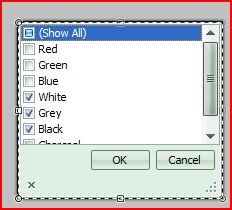
Now, if I want that to show up in my grid with a popup for a field like the following:

image

I have to do something very simple..

repositoryItemCheckedComboBox_colors.SetFlags(typeof(ColorFlags));

The DevExpress tools will enumerate over the enumeration (ha!) and gather all of the appropriate values, create the checked list edit, and display it to the user.  When the user finishes their edit, they are left with the numerical value of the bitwise operation.

That’s all and well, but what if my enumerations are stored in a database ?  I simply can’t use the .SetFlags method by itself, because there is no hard-coded enumeration to pull from!

What I needed to do was to create the enumeration dynamically, at runtime, to pull the information from the database and construct a dynamic enum.

Here is the code I created:

[Serializable]
public enum FlagsType {
    Color = 1,
    Size = 2
}
private Type GenerateEnumerations(FlagsType f) {
    string asmNameString = String.Empty;
    switch(f) {
        case FlagsType.Color:
            asmNameString = "flags_color";
            break;
        case FlagsType.Size:
            asmNameString = "flags_size";
            break;
    }
    //    Create Base Assembly Objects
    AppDomain appDomain = AppDomain.CurrentDomain;
    AssemblyName asmName = new AssemblyName(asmNameString);
    AssemblyBuilder asmBuilder = appDomain.
DefineDynamicAssembly(asmName, AssemblyBuilderAccess.Run); // Create Module and Enumeration Builder Objects ModuleBuilder modBuilder = asmBuilder.
DefineDynamicModule(asmNameString + "_module"); EnumBuilder enumBuilder = modBuilder.
DefineEnum(asmNameString, TypeAttributes.Public, typeof(int)); // Query the database for the value of the flags enumerations using (lsDataContext dbObj = new lsDataContext()) { var enumerations = (from j in dbObj.flags_mainTable where j.type == (int)f orderby j.name select j).ToList(); foreach (flags_mainTable fmtObj in enumerations) enumBuilder.DefineLiteral(fmtObj.name, fmtObj.flag); } return enumBuilder.CreateType(); }


Now I simply use the .SetFlags method, but this time like this:

repoItemCheckedCombo_color.SetFlags(
GenerateEnumerations(FlagsType.Color)
);
 

I doubt this sort of scenario crops up often, but if it does I

hope this helps!


Matthew MacSuga

OMG WOW!

| No Comments | No TrackBacks

Today, I finally achieved one of my many little dreams as a software developer.

Throughout the years, I have wanted one thing.. one tiny, small, insignificant little thing that would make things just a little easier on me.. allow me to have some fun.. be completely legal [not that I wasn’t already!].. and have access to some of the greatest software tools and systems known to man.

I got my MSDN Premium Subscription today with Visual Studio Team Suite !!

I’ve been downloading all of the neatest applications all day, and planning how, what, and where I am going to install things to make the perfect development environment!  I can’t believe after all of these years of wishing someone would buy it for me.. of wishing I had access to the latest operating systems.. today, I finally have it all!  I absolutely can’t wait to dig into all of the features of VSTS Edition! 

So dear reader, you might ask, how did I get this subscription ?  Did I steal it ?  Did I kill someone ?  Did I lie, or cheat ?  Did I bribe someone at Microsoft ?  No.

Microsoft has this incredible program called BizSpark

With BizSpark, a startup company can acquire all of the tools necessary to develop software using the best Microsoft tools, applications, and operating systems.  The requirements are not steep (less than 3 years, make less than $1,000,000 dollars, be privately held, and be developing software that forms the core of your business) and all you have to do is find a Network partner to help you join the program.  *Note:  The network partner should not charge you for anything, so if someone wants too.. find someone else!  Oh, and one other thing.  You may remain in the program for 3 years, and upon your exit, you are required to pay a $100 exit fee.  Cake.

All in all, I highly recommend this program to anyone looking to have the best development tools that Microsoft has to offer.  I can only assume that I will also get Visual Studio 2010 Team Suite Edition as well, when it’s released.  Let me just tell you something, I absolutely can not wait.  You also get PRODUCTION licenses for SQL Server, and Windows 2008 Server [up to 3 years].

Oh, and did I mention these licenses are perpetual ?  Even after you leave the program, your licenses are valid and will remain so.. with the exception that the server products (SQL Server, Server 2008, etc.) will no longer be licensed. 

All I have to say is this:  Thank you Microsoft, for making my little dream come true. 

I am so happy to finally have access to all of their tools and operating systems.  I am going to have so much fun learning all of the new features in VSTS, and Team Foundation Server.  I can only hope that this will increase my output and make me an even better developer. 

Sounds like fun to me. :)

P.S.  Original Blog Article That I Read to Find Out About This:  http://vistadb.net/blog/news/hats-off-to-47-hats-and-microsoft-bizspark/
Thanks Jason[, and Bob!]!!!

Matthew MacSuga

Core Programming Exercises

| No Comments | No TrackBacks

During the course of researching something.. I came across an excellent free e-book:  “Data Structures and Algorithms” (http://dotnetslackers.com/projects/Data-Structures-And-Algorithms/) written by Granville Barnett and Luca Del Tongo.  While it is a little difficult to follow in places, it is an excellent resource for programmers who want to “get back to basics”.

It’s been a long time since I’ve written things like Linked Lists and Sorting algorithms from scratch. This book really does a good job of laying out pseduo code for what you need to do to implement a particular algorithm. 

Programming in C# has really made me lazy when it comes down to fundamental programming principals!  I would be willing to bed that a lot of programmers today don’t know how to write a lot of these things from scratch anymore.. so much is provided to us to use by others.. that we forget how they’re actually built. 

Using the .NET framework I have hardly had a need to do anything like write a Bubble Sort or a Linked List from scratch.  I suppose that I’m fortunate as well in that I started on the .NET bandwagon late.. a lot of the functionality that is in this book is built into the framework now.

I’m currently working through each of the examples and having quite a bit of fun doing it.  I created my own Singly and Doubly Linked List, from scratch.  While not as powerful or efficient perhaps as the built in Linked Lists and others that are built into the framework.. It’s about learning something old, and applying it to something new. I dug up some old C code that I had written years and years ago that implemented a LL.. now I’ve done it in C# as well.

So, I’m working on getting back to basics.. relearning stuff that I learned a long time ago, and having fun implementing the algorithms in C#.  It’s good exercise for the mind and is making me re-think some of the things that I’ve been writing lately.  Creating these in C# is really making me think more in the OOP world.

Check out the book!

- Matthew 

How to ORDER BY a Bitwise Field in SQL

| No Comments | No TrackBacks

So, I had an interesting problem crop up a little while ago.  If you are storing a bitwise “flags” field in your database, and you need to order by a particular flag or flags of that field, how do you do it ?

It turns out the answer is relatively simple.

Table Structure: id, name, flags
Flag Values:  1 = Enemy, 2 = Friend, 4 = Owe Money To, 8 = Owes Me Money

Sample Data:
1, Matthew, 2 // Friend
2, Josh, 6 // Friend, I Owe Money
3, Thomas, 10 // Friend, Owes Me Money
4, John, 9 // Enemy, Owes Me Money
5, Abe, 2
6, Becky, 6
7, Jimmy, 10
8, Jason, 9
9, Dean, 1
10,Joseph, 5
11,Frank, 6
12,Julie, 11 // Frenemy, Owes me Money
13,Hannah, 10
14,Sam, 5
15,Q, 9

So we have a list of people in the database that are fall under a few different categories [flags] as referenced above.  Now I want to query from this table to find out various things about the people contained within.

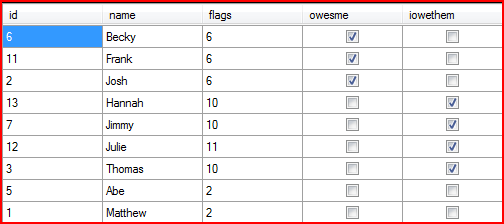
Now I want to see all of the people in the table that are my friends, ordered by those that owe me money, followed by those that I owe money to, followed by any others.

SQL:
SELECT *, (flags & 4 = 4) AS owesme, (flags & 8 = 8) AS iowethem FROM temp WHERE (flags & 2 = 2) ORDER BY owesme DESC, iowethem DESC, name

RESULT:
image

I’m pretty happy with that.  I had a need, and figured out how to scratch it.  I am a little surprised that I had never needed this before, but it certainly does work!  I hope this helps those that might be trying to Google for this.. I did not find a single entry, luckily my hunch paid off.  I wonder if not a lot of people do this sort of thing ?  I love storing flags, and now I can use those for easy ordering as well.

VistaDB Rocks:
I wasn’t completely sure that I was going to be able to pull this off in VisatDB, but sure enough, it worked like a charm and the first time.  I’m quite impressed!  Yet something else that VistaDB does well.  I also tried it in MySQL to make sure I wasn’t on drugs either. 

Experiment, play around with it, see if you can find a use for something like this.

Happy programming!

Matthew MacSuga

A Move to a New Host

| No Comments | No TrackBacks

I moved the site to a new hosting facility, and had a few problems along the way!  It’s up and running now and should be in good shape.  If anyone notices any problems, please let me know :P

P.S.  I’m going to try and write a few more articles this week and post some pretty cool code.  While this is called “C# By Design”, I’ll probably be writing a bit about PHP and how to consume .NET web services!  I had a lot of issues with Google while developing my solutions so I think they’ll be of use.

Thanks,

Matthew MacSuga

Maintaining a Blog is Hard, and So is Coding

| No Comments | No TrackBacks

I’ve decided that maintaining a blog is hard work.  You might be prompted to ask, “Matthew, why is maintaining a blog hard wokr?”  I would answer, “Because you’re supposed to write in it!”

My original intention was to write about the things that I’m working on.  Unfortunately, this means that I have to actually take the time to do so.  Lately, time has been very limited because I’ve been working on a lot of really difficult and completely cool stuff!  That means, I have a back-log of things to write about.

Things I’ve been working on lately

1.  Creating a new .NET based Ski Reporting & Faxing System
2.  Writing API’s for the ski reporting system
3.  Writing applications in PHP to consume the data from the ski reporting system
4.  Writing PHP again!
5.  Learning a new database (VistaDB) [http://www.vistadb.net]
6.  Learning more about Developer Express’ XtraReporting Suite
7.  Learning about Windows Workflow Foundation  (WF)
8.  Learning how to use Ra-Ajax [http://www.ra-ajax.org]
9.  Writing Multi-Threaded Windows Management Applications for said ski system!
10.  Not skiing
11.  Learning how to use Click Once deployment
12.  Reading the web, reading books, learning new things, participating in newsgroups

What do I intend to blog about next?

Namely, the above.
I’ve been doing so much programming, learning so many new things, it’s just been crazy.  I can’t wait to share some of the neat PHP code that I wrote that uses NuSOAP and calls remote web services written in .NET.  I learned some new things, and came up with some code that I had an extremely hard time finding the answer to on Google.  In fact, I did not find the answer on Google!  A co-worker and I found the solution.  So I will definitely be writing about that (Hint:  Passing List<T> data TO/FROM a Web Service) experience as it may help some.

I’m going to write a white-paper style article on the ski reporting system, how it all works.. the challenges I faced.. what new things I created to solve problems.. I did (in my opinion) some seriously nice work on that system.  I can’t wait to explain it all to everyone.  It’s based in both Linux (PHP) and Windows (C#/.NET) with Web Services being the interface between both.  I also developed new database code to work with VistaDB, which is a new database I found that I absolutely love.  I’ll be writing about that as well.

Developer Express
The Developer Express [http://www.devexpress.com] products are absolutely amazing.  I discover more and more neat stuff about the product suite every day.  I learned that you can use the XtraReporting suite to create really NICE web pages [example:  Ski Idaho Conditions Report Summary] without creating all of the HTML yourself.  In my opinion, this is one of the nicest features of the entire product line.. not only can you create PDFs and Images, but flawless HTML.  The things that I can do absolutely amaze me, and I still don’t think I’ve scratched the surface of everything that I can do.  I will be writing a separate post about that, and how the solution works in both .NET and PHP.

Ra-Ajax
I’m also investigating Ra-Ajax [http://www.ra-ajax.org] for doing all of my AJAX related stuff.  I’ve been a huge jQuery fan lately, but Thomas Hansen is a friend of mine and I really believe in the work that he’s doing.  He is a top-notch programmer, and he’s been a huge help to me since I’ve known him!  You’ll remember that I previously suggest Gaia Ajax Widgets – I do not anymore.. in addition, Ra-Ajax is a far superior product.  Thomas fixed everything that he did wrong in Gaia, and made it all better in Ra.  Huge kudos go out to him for what he’s doing and giving to the .NET community, and those that want to develop cutting edge FAST AJAX applications with a minimal amount of JavaScript code creation.

I will most likely be writing a separate series of articles on Ra-Ajax at a later time detailing my experiences with it.  You might be prompted to ask why I would use Ra, when I have the Developer Express product.. well, DX does some things really well, but like most ASP.NET toolkits, they are to heavy.  Ra-Ajax is lightweight, open source, and easy to implement.  Much faster than the other guys.. even though it might not look as good, looks can be fixed.. trimming the fat off of heavy is much harder to do.

Disclaimer:  I’m friends with Thomas, and I support him and his endeavors.    I sound like I’m writing marketing speak, and getting paid for it – but I’m not, honest!!  I just write about what I use, and believe in.  If I think something about it sucks, I’ll write about that too!

Windows Workflow (WF)
One last thing before I go – I discovered Windows Workflow Foundation, and absolutely recommend Pro WF: Windows Workflow in .NET 3.5 (Pro).  This book really helped me understand Windows Workflow (WF) and I actually implemented it in my ski reporting system.  Unfortunately, I had to remove the code later-down-the-road because I had some issues, and being under pressure and all.. it was very easy to “remove” though, because it just encapsulates logic.  I love the technology, and can’t wait for the next release.

Microsoft Charts!
Oh, by the way, did you know Microsoft released a Charting Suite (by the Dundas people) for free, as part of .NET 3.5 SP1 ? 
Blog by Jason at VistaDB:  Free Chart Control from Microsoft For .NET 3.5
Direct Microsoft Download:  Download Charts Control

I won’t ever use them, but still cool that they did that.  (I won’t use because I have charts in Developer Express XtraCharts suite – heh, having an Enterprise subscription sure helps!)

Writing Too Much Again
Sorry for being so long winded.
Upcoming posts will be chalked full of code and interesting tidbits of information that I’ve learned over the last few months.  Will be worth it!

Amazon Affiliate Program [ I sold out ! ]
P.S.  I am embedding Amazon.com links now (Pro WF) link.  I will not link to anything I don’t own, but if you buy something – I sure wouldn’t mind a kickback, so I joined their referral program.

Matthew MacSuga

/// <summary>
/// Converts NULL values to String.Empty in any object
/// </summary>
/// <param name="o"></param>
public static void ConvertNullToEmptyString(object o) {
    Type stringType = typeof(String);

    var q = from n in o.GetType().GetProperties()
                    where n.PropertyType == stringType
                    select n;

    foreach (PropertyInfo p in q)
        if (p.GetValue(o, null) == null)
            p.SetValue(o, String.Empty, null);
}

The above code is a little function that I wrote that converts all NULL string references in an object to String.Empty.  Don’t forget to add in a Reflection using statement.

public myTestClass myTestClass() {
    myTestClass n = new myTestClass();
    //    ?Get from Database?
    n.string_1 = null;
    n.string_2 = "Hello";

    //    Convert null values
    ConvertNullToEmptyString(n);

    //    Return the new object
    return n;
}
/// <summary>
///    Simple class
/// </summary>
public class myTestClass {
    public string string_1 { get; set; }
    public string string_2 { get; set; }
}

This example shows how it could be used.  This way, when running a JSON based webservice, the data returned van be filtered through ConvertNullToEmptyString and that will make JavaScript much happier, rather than having to deal with … “string_1” : "null, … we get a : “”, which is then immediately usable.

- Matthew

ASP.NET, AJAX, and jQuery

| No Comments | No TrackBacks

I’ve been doing a lot of ASP.NET work lately, and have in fact enjoyed it very much.  Since this is a new and “recent” development due to my past being in Classic ASP, then PHP I have had a lot of new things to learn.. also, for nearly the last two years, I have been doing WinForms only programming, and have forgotten a lot of the stuff I once knew!

The ASP.NET model is considerably different from the PHP 4 model.  Some things are far easier, and other things are just different.  I wanted to learn how to use an HTML/JavaScript/ASP.NET model [like I would do in PHP] and had a few things to figure out.  Fortunately, there exists a lot of places where people have pioneered this stuff before I did.

Here is how to use jQuery with ASP.NET 3.5.

Figure 1:  Create a new C# .NET 3.5 Web Service [SampleService.asmx]

using System;
using System.Collections.Generic;
using System.Linq;
using System.Web;
using System.Web.Services;

namespace admin {
    /// <summary>
    /// Summary description for CMSWebServices
    /// </summary>
    [WebService(Namespace = "http://tempuri.org/")]
    [WebServiceBinding(ConformsTo = WsiProfiles.BasicProfile1_1)]
    [System.ComponentModel.ToolboxItem(false)]    
    // To allow this Web Service to be called from script, using ASP.NET AJAX, uncomment the following line. 
    [System.Web.Script.Services.ScriptService]
    public class WebServices : System.Web.Services.WebService {

        [WebMethod]
        public string HelloWorld() {
            return "Hello World";
        }
    }
}

Well, that was simple.  Most of the code as you can see, is already written for you by Visual Studio.

Figure 2:  Define an ASP.NET Page [SampleConsumer.aspx], add jQuery, and this script

<script language="javascript" type="text/javascript">
                function testme() {

                    $.ajax({
                        type: "POST",
                        url: "SampleService.asmx/HelloWorld",
                        data: "{}",
                        contentType: "application/json; charset=utf-8",
                        dataType: "json",
                        beforeSend: function(xhr) {
                            xhr.setRequestHeader("Content-type",
                         "application/json; charset=utf-8");
                        },
                        success: function(msg) {
                            alert(msg.d);
                        }
                    });

                }
</script>

Figure 3:  An HTML button in the ASP.NET page

<input id="Button1" type="button" value="button" onclick="testme();"/>

Well, that was easy, eh ?  Simply pushing the button will write HelloWorld in the Alert Box.

Figure 4:  Sources
http://encosia.com/2008/06/05/3-mistakes-to-avoid-when-using-jquery-with-aspnet-ajax/
http://encosia.com/2008/05/29/using-jquery-to-directly-call-aspnet-ajax-page-methods/
http://encosia.com/2008/03/27/using-jquery-to-consume-aspnet-json-web-services/

I found those series of articles to be extremely helpful in figuring all of this out.  Next time, I hope to write a little bit more about what I’m doing, but wanted to make sure this information was easy to find.  It took me a little while to dig up the exact ‘how-to’ and read through all of the information on the topic.

Note:  This is a little sloppy, sorry :)  I just don’t feel like going to indepth on this topic.  You can find additional resources using the links above. 

YMMV.

- Matthew

Recent Comments

  • Anonymous: This is really very useful. Do try this also http://geekswithblogs.net/shahed/archive/2008/07/24/123998.aspx read more
  • Mohan: Thanks a lot for sharing. Simple, to the point, and read more
  • Christian Schiffer: Dude here is the solution to your problem, it drove read more
  • Matt Warren: You don't need FirstOrDefault to access the key values after read more
  • Aros Attila: Very useful article thanks for sharing :). read more
  • Trevor Sullivan: Good article. Thanks for posting for us .NET people :) read more
  • Jeffrey A. Reyes: Hi, good day. Thanks for the information you have here. read more

Recent Assets

Find recent content on the main index or look in the archives to find all content.